
How to Claim DACS PayBack
In January of every year the Designers and Artists Collecting Society (DACS) send emails out to all their members telling them that their Payback scheme is now open. Here in the third of our articles on how to maximise your income as a writer, illustrator translator, narrator, photographer, and any other type of contributor to published work, we will cover what DACS Payback is and how to claim.
We will start by apologising in advance to all authors, narrators and translators as this article relates to visual artists or artists’ estates. We are sorry. We can, however, tell you that you can claim the same through your respective organisation such as through the Author’s Licensing and Collecting Society (ALCS), which are covered in separate articles, please see the links at the bottom of this page. In the meantime, by reading this article, you will have a better idea of what to look for and what to ask your collecting organisation, on how to claim the equivalent of DACS Payback. You will also have something to share with your visual artists workmates and friends that will not only help their income but have a value that is much more than anything financial.
DACS Payback is open to all kinds of visual creators. In 2022 DACS paid over 96,000 artists, illustrators and photographers a share of £4.6 million in royalties. Individual payments were up to £350 for books and magazines and over £2,000 when also claiming for TV.
For many working artists, DACS Payback provides much needed additional income, helping to pay for materials, studio rent and bills, especially at a time when many are seeing an increase in the cost of living. So it is more important than ever to spread the word to all you visual artist friends etc. so please share, post, comment etc. so we can help as many people as possible. Thank you.
The Copyright Question?
The first most important thing to know about all schemes such as DACS Payback is you can only claim for work where you own the copyright. So when you are negotiating a contract etc. hang on to your copyright as it will benefit you for years to come. Also note that publishers can’t claim DACS Payback, nor can they claim for Public Lending Rights (PLR) etc. To us it seems a bit mean not to allow illustrators and authors to keep the copyright of their own work, even if they sign a clause in the contract stating that they get no royalties from book sales. Where your copyright is already owned by the publisher, for example, then why not try to negotiate the copyright reverting back to you, even if it comes void of any financial gain from the publisher. At least it will allow you to claim for DACS Payback, for PLR, and other similar schemes that they can’t claim.
What is DACS Payback?
Very basically DACS Payback is an annual scheme run by DACS to distribute the money owed to visual artists or artists’ estates by various collective licensing schemes, such as TV broadcasts and educational recording. Every year DACS will collect a share of these royalties for secondary use of your images, such as photocopying, and pay it to eligible artists who’ve signed up to the DACS Payback scheme. All you have to do is sign up to the scheme to maximise your income by benefiting from DACS Payback.
DACS Payback has been going since 1999, and in the last 24 years it has paid out £70 million in royalties to visual artists. The main money earner here is from the Copyright Licensing Agency (CLA) which sells photocopying licences. So when someone in a school, university, public sector organisation or other type of business wants to photocopy pages from a book which features your work, as the creator of the work being photocopied, you are entitled to a royalty. Rather than ask the person to contact you every time they photocopy your work, the organisation pays an annual licence fee that covers the photocopying of copyright-protected works. The money is then split into royalty shares for different types of creators: authors, publishers and visual artists whose work has been featured in UK publications.
For a visual artist, you can claim your royalties through DACS Payback. Authors etc. can claim the same through their respective organisation. As you can imagine there is no way of knowing who copied what or how many times. Far too cumbersome and we don’t have time for that. So collecting organisations such as DACS collects all this money then divvies out the total between all those who apply. So our job is to annually complete and submit a claim before the deadline, which was for 2020 the 24th February for books and magazine, and 17th April for the number of publications and TV. They decide how much to give you based on a formula, i.e. how many books and how many illustrations and how many uses of those illustrations, also magazines etc. So you have to add up every illustration you have ever done. We have banged on before about having a full register of all your books and publications and that is why we started all this with an article on how to Create an Asset Register, a Log of All Your Published Works, from Scratch.
The good news is you can do it all online and it’s relatively simple, so how do you make a DACS Payback claim?
Where to Start?
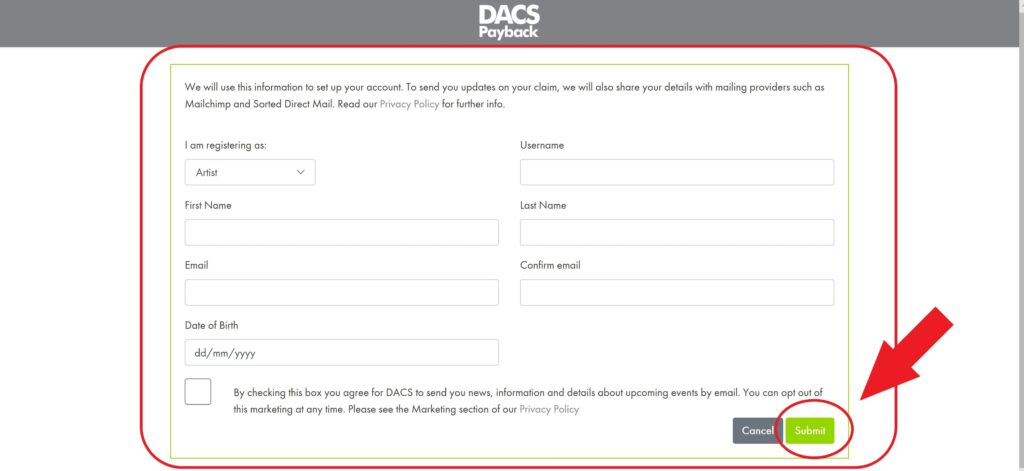
If you don’t have a DACS account yet then that is the best place to start! Step one is to go to the DACS website https://www.dacs.org.uk . Once you land on the home page click on “For Artists” from the top menu line, then click on “Find out more” under the Payback header, then click the button “Login to claim Payback” and finally at the bottom of the login box select “New to Payback? Sign up here” …… or just follow this link by clicking here!. Fill the form in with your details and submit. DACS will send you an email with a link to set your password and you are done with the first step. You now have a DACS account.
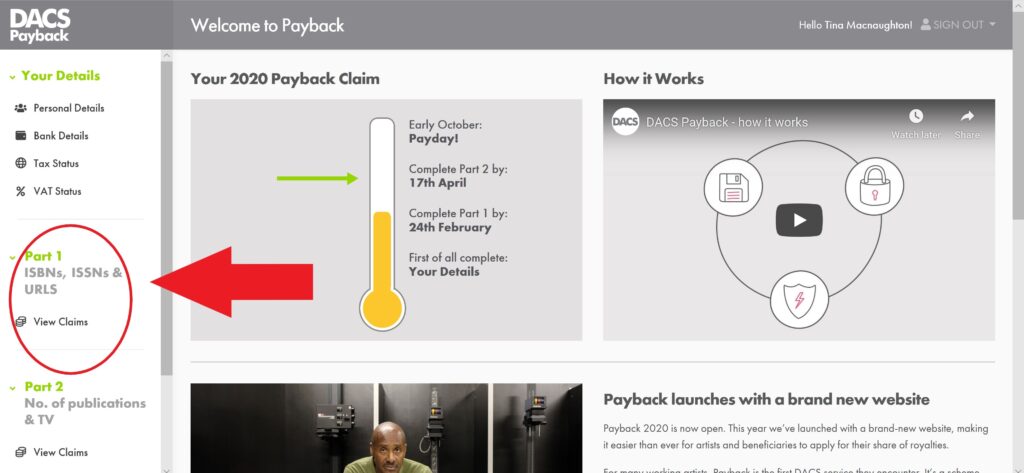
Once you login to your account start by filling in your personal details, bank details, tax status and VAT status by clicking on the associated links at the top left hand side of the page as shown in the screenshot opposite.

Part 1 - ISBNs, ISSNs & URLs
Once that is all done and out of the way you can now move on to starting your claim by going into “Part 1” and clicking on the “View Claims” button as per the screenshot opposite.
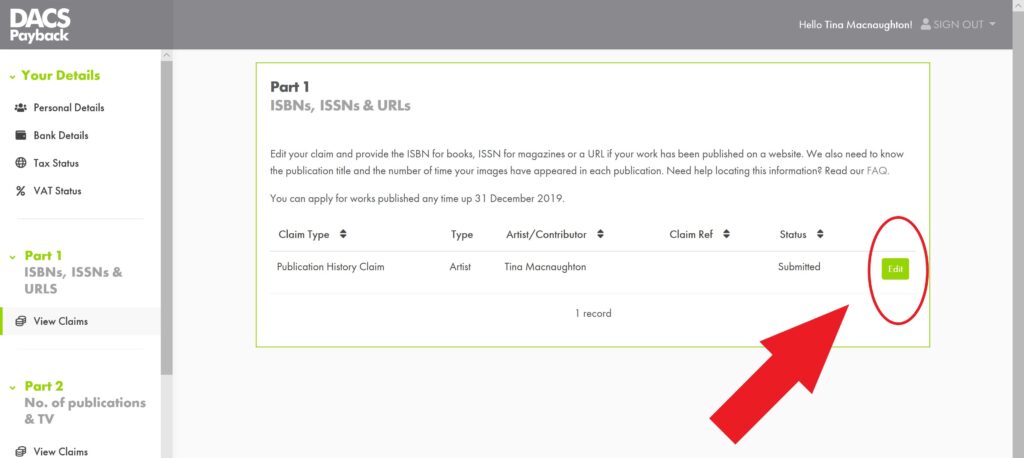
This will take you to the Part 1 page where you can start to edit your publication history claim by clicking the edit button.
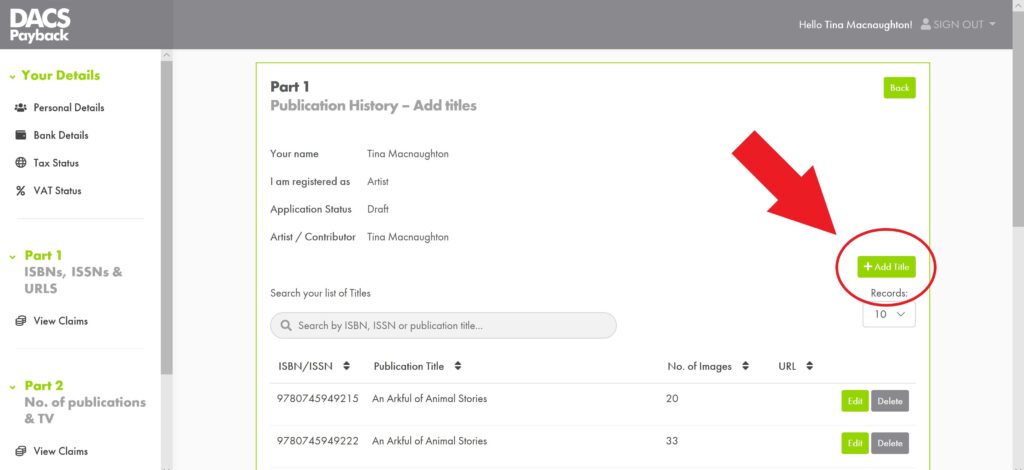
Now you can start adding titles by clicking the button “+ Add Titles” on the left about half way up the page.
At this point you will need all your books’ International Standard Book Number(s) (ISBN)s, all the magazines’ International Standard Serial Number(s) (ISSN)s that your work has appeared in and the Uniform Resource Locator (URL), which we all know as the website address, for any websites your work is featured or used on.
If you don’t have all these then I highly recommend you start thinking about creating a catalog of all your published work and where all your work has/is being used because you are going to need it, not just for this but for almost every other article we have either already written, or will be writing, on how to maximise your income as an illustrator or author. Now what seems to be the delay? 
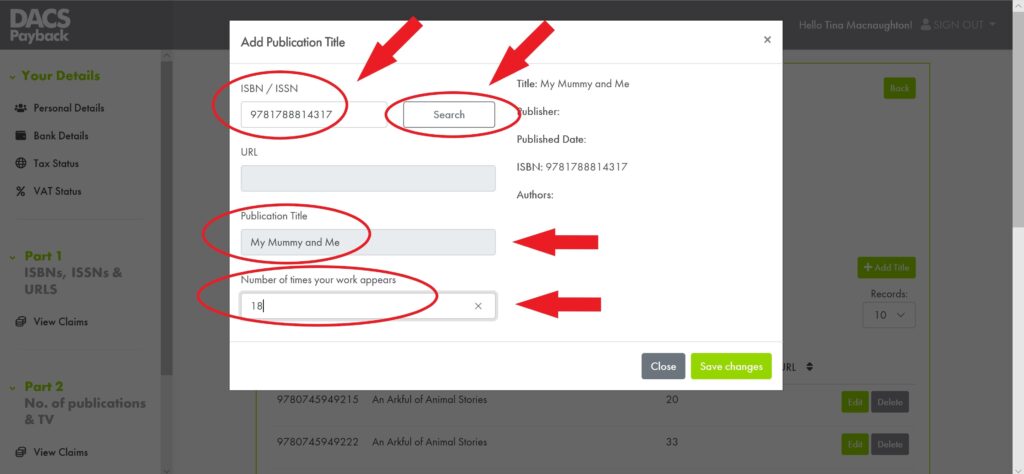
To add a publication title to your claim, simply input either the ISBN or the ISSN into the top box and then click search. If your ISBN / ISSN does not exist the system will automatically tell you. Just double check what you have entered and correct it, if need be.
ISBN / ISSN Search.
Once your ISBN/ISSN has been accepted you will be able to click on the search button next to it and the database will either find your book or magazine for you, as in the example in the screenshot opposite, or not. If it does then all you have to do now is fill in the number of times your work appears in that particular publication, which you should have in your books and publications catalog of all your work, then click the “Save Changes” button in the bottom right hand corner of the screen and you are done. As simple as that! Right let’s add another, and another until we have done them all which we call done done!
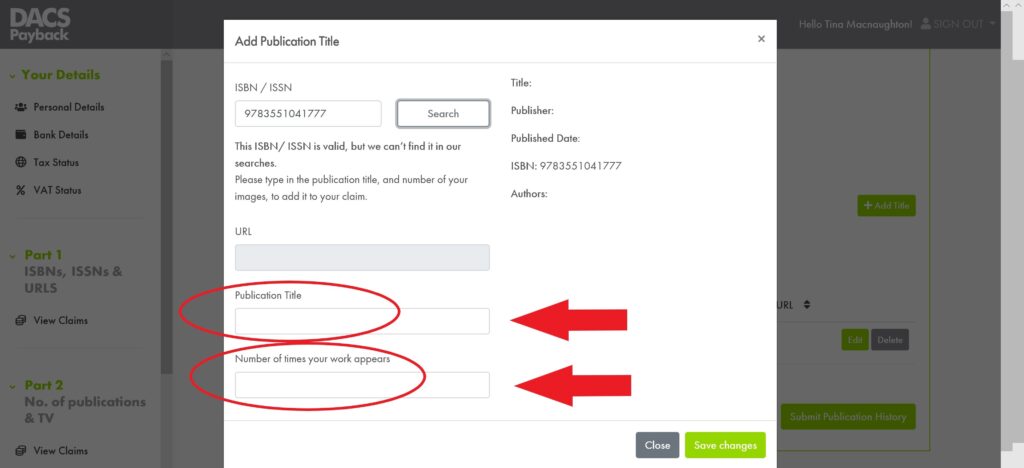
If the ISBN or ISSN is not in their database then you will get a message like that in the screenshot below telling you that the ISBN or ISSN is valid but they don’t have it in their database. Don’t panic, simply fill in the title and number of images information before clicking the “Save Changes” button in the bottom right hand corner of the screen.
Keep Good Records!
The one biggest bit of advice we can give you at this point is that each time you add a title to your DACS Payback claim, or any other collecting organisation claim, is to make a column in your books and publications log etc. to show that you have added it to your claim. Why? because if you don’t you will find yourself each year trying to work out or remember what you have already registered and what still needs to be added. We’ll explain what will happen to you in the next bit is you don’t keep good records, that just might drive you mad, depending on how many titles etc. you have.
Now as you do this for the first time, or even when you are updating your claim each year, you will make mistakes, or get bored doing it or distracted etc. We are only human and this stuff is dull work let’s face it. The most common mistake we have made in the past is forgetting what we have just added and inadvertently try to add the same title again.
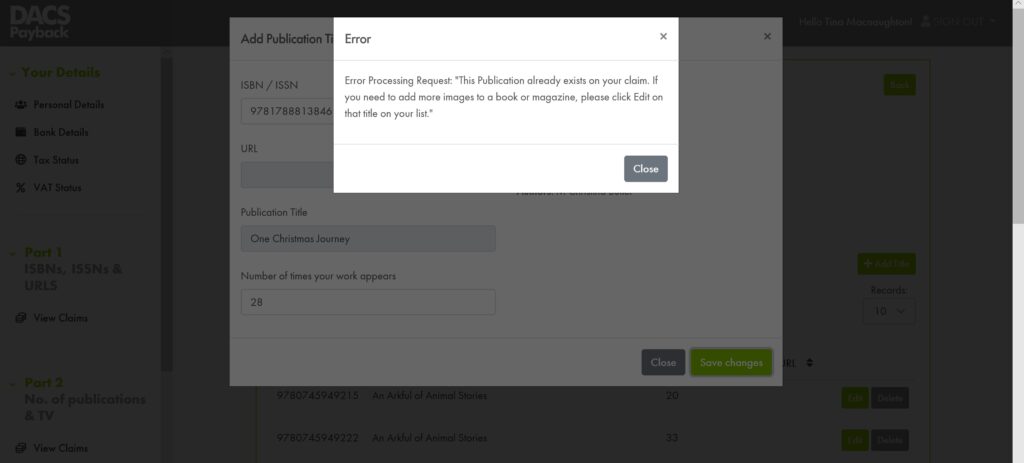
Well when you do the system is setup to help you by giving you an error message just like the one in the screenshot below. What can you do? Nothing. Just close the error window and enter the next title you need to add. No big deal we know but if you don’t keep a good record of what you have already entered you will see this time and time again. It will start to drive you insane knowing that you are just repeating what you have already done, wasting time on a dull task that is going to take longer to finish. It can be quite demoralising. Please don’t do that to yourself and make sure you have a good system to avoid this. Please, we beg of you, we do not want anyone going through what we have been through ever again!
For books and magazines once you have entered the information it will be held against your account by DACS and you will only need to enter new work each year. Please note that it does not matter when your work was printed in a book or magazine, or even if the title is out of print, you can still claim.
Part 2 - No. of Publications &TV
OK that was Part 1 all sorted out, now we can move onto Part 2. This is the part that can bring in the biggest return, especially if your works have featured on TV, so stick with it as all your painful good work will give you payback for years to come as things stand.
To go to Part 2 from the add title page simply click on the “View Claims” link in the bottom left hand corner of the screen under the “Part 2” heading, as shown in the screenshot opposite.
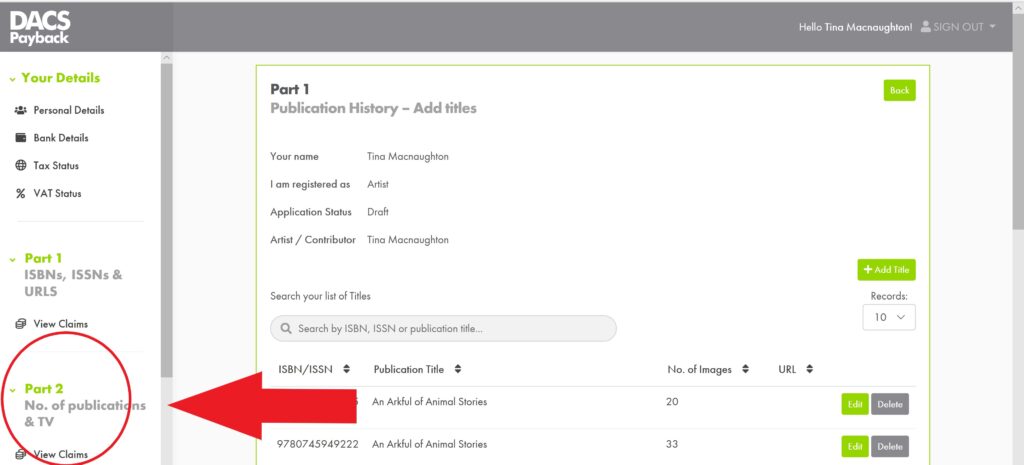
Once in Part 2 you have two further sections to edit. One on works in publications and the other on works on TV. We’ll start with the works in publications as that is the one most of us will most likely have, plus it’s the top one on the list so let’s work our way downwards from there.
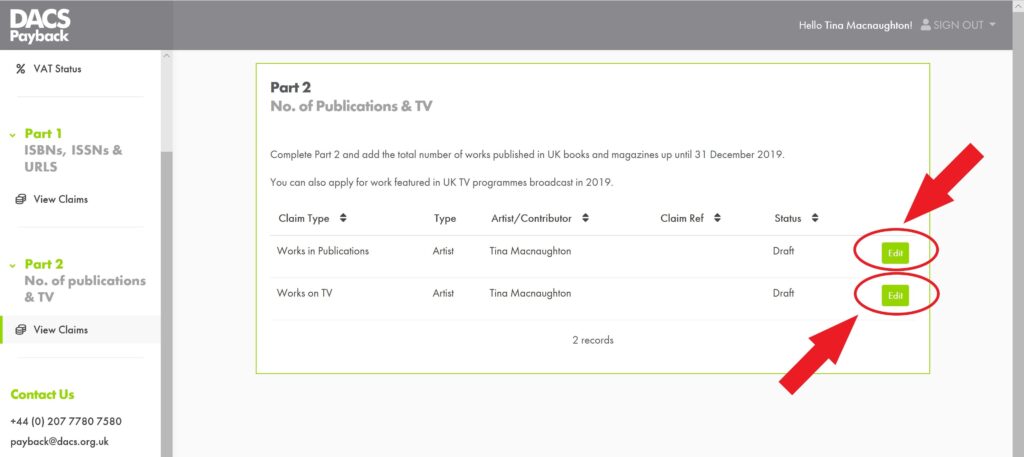
Works in Publications.
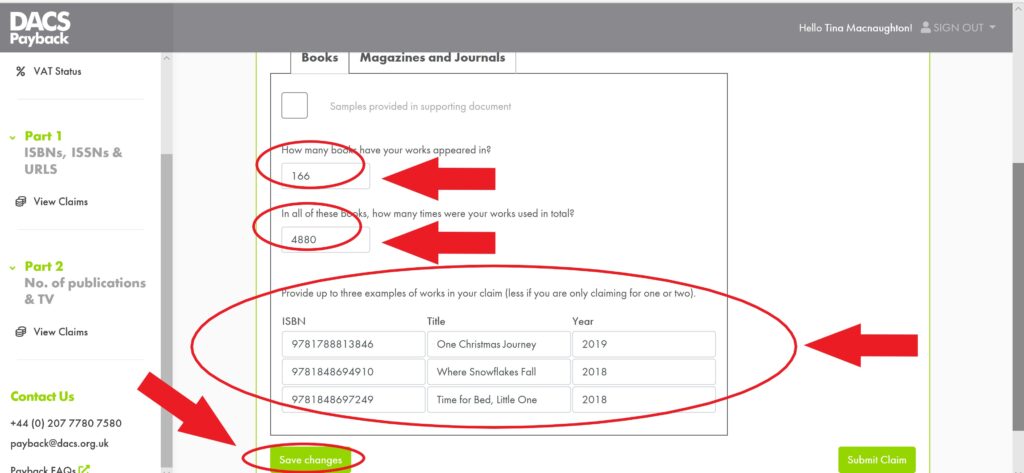
Once you are on the page for work in books and magazines you will see that there are two tabs to select from. The page starts on the Books tab where you add in your information on the number of books your work appears in. We are sure that we don’t have to tell you but we will, just to be sure. This is not just the number of books you have worked on but the total number of separate ISBNs your work has appeared in. If a book title of yours has been published as a hardback, a paperback and a board book, then that one book title, therefore, has three separate ISBNs and in your book count it is three books, just not one. Each ISBN counts as a separate book so please don’t under estimate the number of books you have. Again this is why a log of all your work is very important …. We might have mentioned that already!
The next line asks for the amount of times your work was used in all the above books. Here too be sure not to under sell yourself. Let’s say that you have one image that appears in a book five times, yes the same image five times in the same book, and no other images in that book, then that is a count of five times your work is used in that book. Now do the same for every image and for every book and you have your number to use. If you don’t have copies of all your books then either ask your publisher(s) for copies or go back through your work, or estimate it from similar editions of your book(s) which you do have a number for. It is a difficult thing to have to remember every time you work on anything to keep a record of the final number of images used. However, if it is not already in your contract ask for a free copy of the final book to be sent to you to be included in the contract. To the publisher this is pennies they spend only once on each book, to you it is pounds of DACS Payback etc. each year.
Works in Books.
In the next part you are asked to provide up to three examples of work in your claim. We tend to use the three most recent UK published ISBNs that we have for each client. Once completed, click the “Save Changes” button.
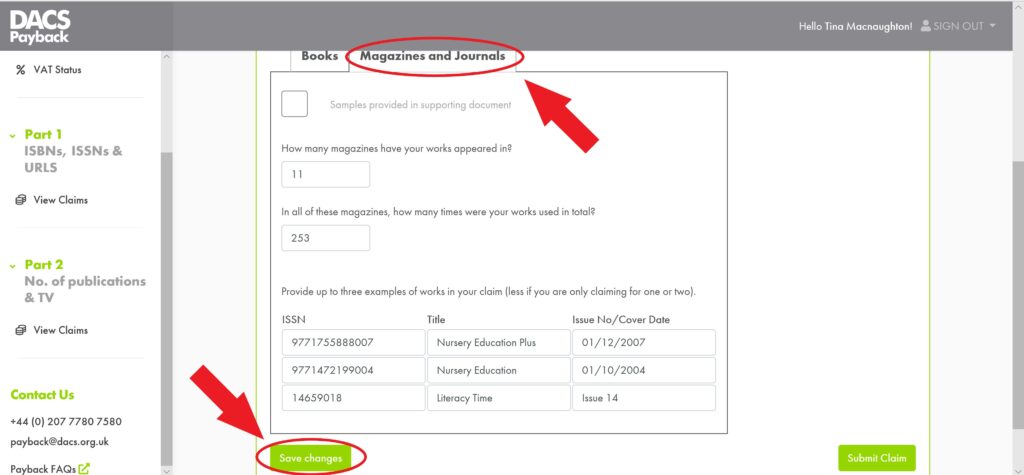
Works in Magazines
Once done move over to the Magazines and Journals tab and do the same, following the same principles as for the books. Once completed and you are happy click the “Save Changes” button again.
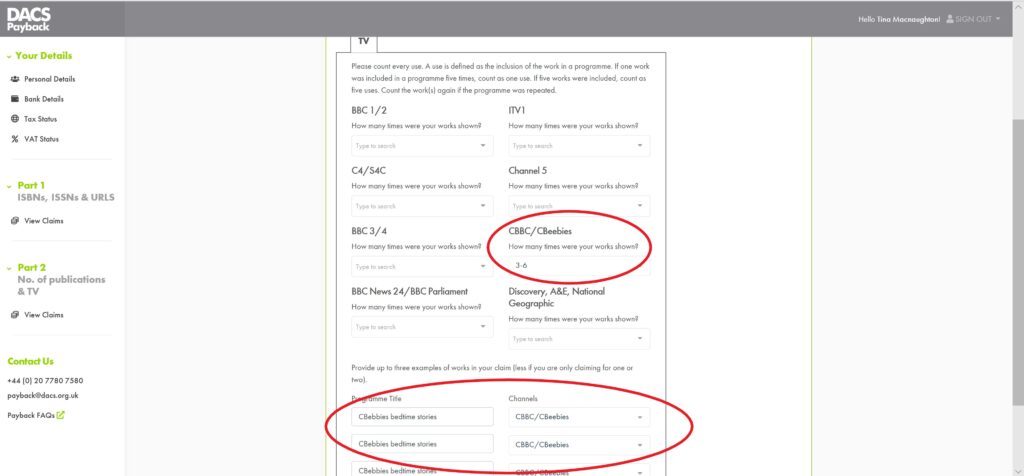
Works on TV.
Now for the final section, and potentially most lucrative one, TV. From the Part 2 front page click the button to edit works on TV and fill it in as much as possible, remembering that for work shown on TV you can only claim for the previous year ended. For DACS Payback 2020 you can only claim for work shown on TV in 2019. Below is an example from the latest submission we have completed for a client, however, yours will most probably be very different and for more years than not we have submitted a blank page for some clients, so don’t worry about it if you don’t have anything much to claim.
Time to Submit Your Claim
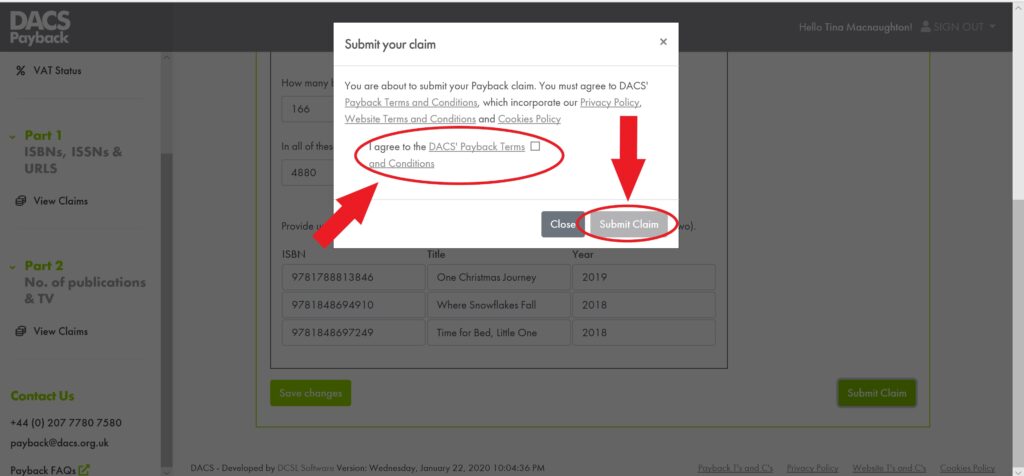
Now we can go ahead and click on the “Submit Claim” button as we are done and ready to get this thing out of our hair for another year. What a fantastic way to end January, assuming you have already submitted your tax return that is! …. did you just remember that there was something else you had to do!
Now we are Done but Not Done Done
We are done but not done done. You will now get a message asking you to agree to the DACS Payback terms and conditions. If you agree with their terms and conditions then tick the box and click the “Submit Claim” button …. We are now done done ….. How does that feel? …. All we have to do now is sit back, and relax for another year knowing that we have submitted our DACS Payback claim before either deadline and in a few months’ time a payment will be made into our nominated bank account. Time for a cup of tea or something much stronger!
Dutch Public Lending Rights
We can’t finish this article without mentioning Dutch PLR, which is collected by DACS. In the Netherlands, public libraries pay a royalty to the Lending Right Foundation for all books that they lend out. DACS’s Dutch sister society, Pictoright, distributes a share of these royalties to visual artists who are eligible for the scheme. To claim your share of these royalties your work must have featured in a UK published book which has been subsequently translated into Dutch and published in the Netherlands.
Once you are signed up with DACS you should get an email reminder each year to complete and submit your Dutch PLR claim. You simply have to be both on their mailing list and you have to remember to fill in a form each year online and there is a deadline!! Forget and you don’t get!
Now we are Done Done!
Naturally now that we have written all of this the format will probably change again and will be a new improved again look, but we are sure it will not be so very different from the above and so would be useful in some way so happy adding.
The first time you completed a DACS Payback claims form it will most probably take you some time to do. It will, however, be time well invested as each January, as soon as you get the email telling you that DACS Payback is open you can go in and update the previous year’s claim and within a couple of hours it’s submitted.
Can Someone Else Do All This For Me Please?
The simple answer is yes. This is why we are here! We offer this service, and more, to all authors, illustrators, translator, narrator, photographer and any other type of contributor to published work. If you are interested then please Contact Us and we’d be happy to talk to you about finding the right setup, one that would work for you and to allow you to Squeeze that Lemon as much as possible to maximise your income.
Naturally we would also be more than happy to share our thoughts and experience with you to help in any way we are able to. Please if you do have more questions or are having any issues relating to any of the things we have been talking about, or even some advice or experience to share, then please do drop us a line, we would love to hear from you, and we would gladly help you as much as we can.

Recommended Reading
How to start maximising your income as an Author, Illustrator etc.
Setting up a digital record of all your work from scratch.
How to join and make claims in as many places as possible!
How to claim DACS Payback (this article is for visual artists only).
How to claim secondary use royalties through ALCS
What is an ISBN or an ISSN and why should I care?